Yahoo mailbox full? See what you can clear.
Find bulk mail taking up space, review the results, and choose what to remove. Mailroom runs on your Windows or Linux computer.
Free trial: 14 days or 500 MB of cleanup, whichever comes first. No card. Then £6.99 for one mailbox for one year. No auto-renew.
You'll connect with a Yahoo app password — how to make one (about a minute). Your trial starts when you connect your first Yahoo mailbox. Nothing is sold on this page: you buy from inside the app, which opens Stripe in your browser.
Four calm steps. You stay in charge the whole way.
No bulk-deletion roulette. Mailroom scans, shows you what is taking space, and waits for your go-ahead before anything is removed.
Your mail is processed on this device. Scanning, sorting and deleting all happen here. What we receive is limited licensing and service data, never your messages, and listed in full — every channel, right here.
A careful tool for a frustrating problem.
Mailroom is built around outcomes, not features — reclaim space, reduce clutter, and trust every deletion.
See exactly what goes — before anything goes.
Every cleanup is a list you can read: who the mail is from, how much space it takes, and why KeepSafeTM thinks it's safe to clear. Uncheck anything. Nothing is removed until you say so, and mail sent to Trash stays there under your provider’s own retention rules.
That mailbox is mine.
Yahoo told me I was over the limit. I started clearing my mailbox, then an hour later I thought — hold on. What if instead of clearing it, I did the opposite? I put the cleared mail back from the Trash on purpose, because I wanted to see exactly what Yahoo does to an account that stays over, and what it would cost me to give in and pay monthly instead. That is Yahoo's own Trash, not a Mailroom feature — Mailroom does not restore mail. This is how Mailroom was born in my mind, and then I started drafting the product.
The numbers shown on this page are the same mailbox at different points. The screenshots below show it at 15.4 GB, over the 15 GB limit. The video shows it at 32.7 GB, after I put the mail back. One account, one year, two readings.
Initially the KeepSafeTM engine could identify about 2 GB of mail we could safely delete. We worked hard and improved it — a bit more, then more, then more again.
Mailroom now finds 21.7 GB of that 32.7 GB it could clear. That is one mailbox, not a forecast for yours. And I have not paid Yahoo a single penny for storage — I have years of room left.
— Mailroom author
Yahoo will give you a date. Then it moves.
Yahoo gives you a date. Mine said 29 July in one banner and 22 August in another, on the same account in the same week, and an email called it a final reminder. Whatever yours says, the arithmetic does not change: clearing the junk is cheaper than renting space for it.


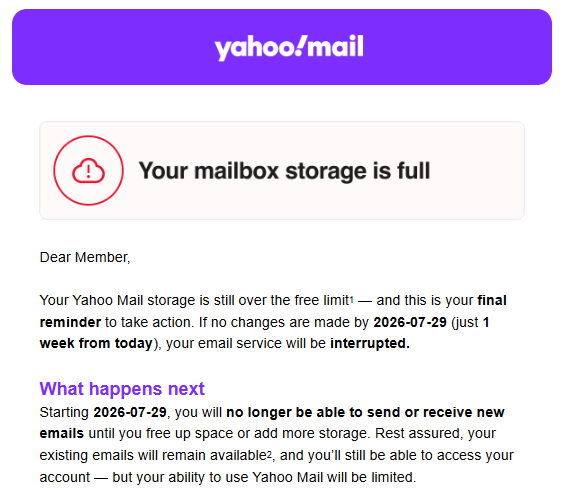
Act on the date in your own mailbox, not on ours.
Try it free. Then pay once for the year.
You pay once, for a year. Yahoo’s answer to a full mailbox is rent — billed every month, for as long as you keep the mail, and it does not remove a single dead newsletter. This is the other answer.
- Unlimited scanning & cleanup
- One mailbox — Yahoo today, more providers planned
- Review before delete & receipts
- Everything in Single
- Up to three accounts
- One licence for the household
- Everything in Family
- Up to six accounts
- Best value per account
There is nothing to buy on this page. Download Mailroom, run a scan, clear a first slice free — and if it was worth it, the purchase is initiated on your request from inside the app and will open your browser to Stripe, our secure payment provider. One year, one-time. No subscription, no auto-renew, no card stored by us. Prices are in GBP and these are the prices: there is no introductory rate and no countdown.
Yearly licence · one-time purchase for the year · not a subscription · prices in GBP.
Yahoo first — on purpose.
We’d rather do one provider properly than several badly. Yahoo Mail is the one we support today.
Space people found they could clear.
Every entry is a card someone chose to publish, to support Mailroom and the features still to come. Sizes are scan estimates of what could be cleared, rounded, not confirmed deletions. Nothing here identifies a mailbox, a sender or a subject.
Straight answers.
That is SmartScreen, and it is expected for a new publisher. Every Mailroom release is code-signed with a standard OV code-signing certificate issued to Mailroom-LTD, so the permission prompt names us as the publisher. But SmartScreen trusts publishers by reputation, not by certificate alone, and a new certificate only earns that as installs accumulate. Until ours has, the warning is about how few machines have seen the file, not about anything found inside it. The simplest way to avoid it is to install from the Microsoft Store. With the direct download, check the publisher shown is Mailroom-LTD, then click More info → Run anyway.
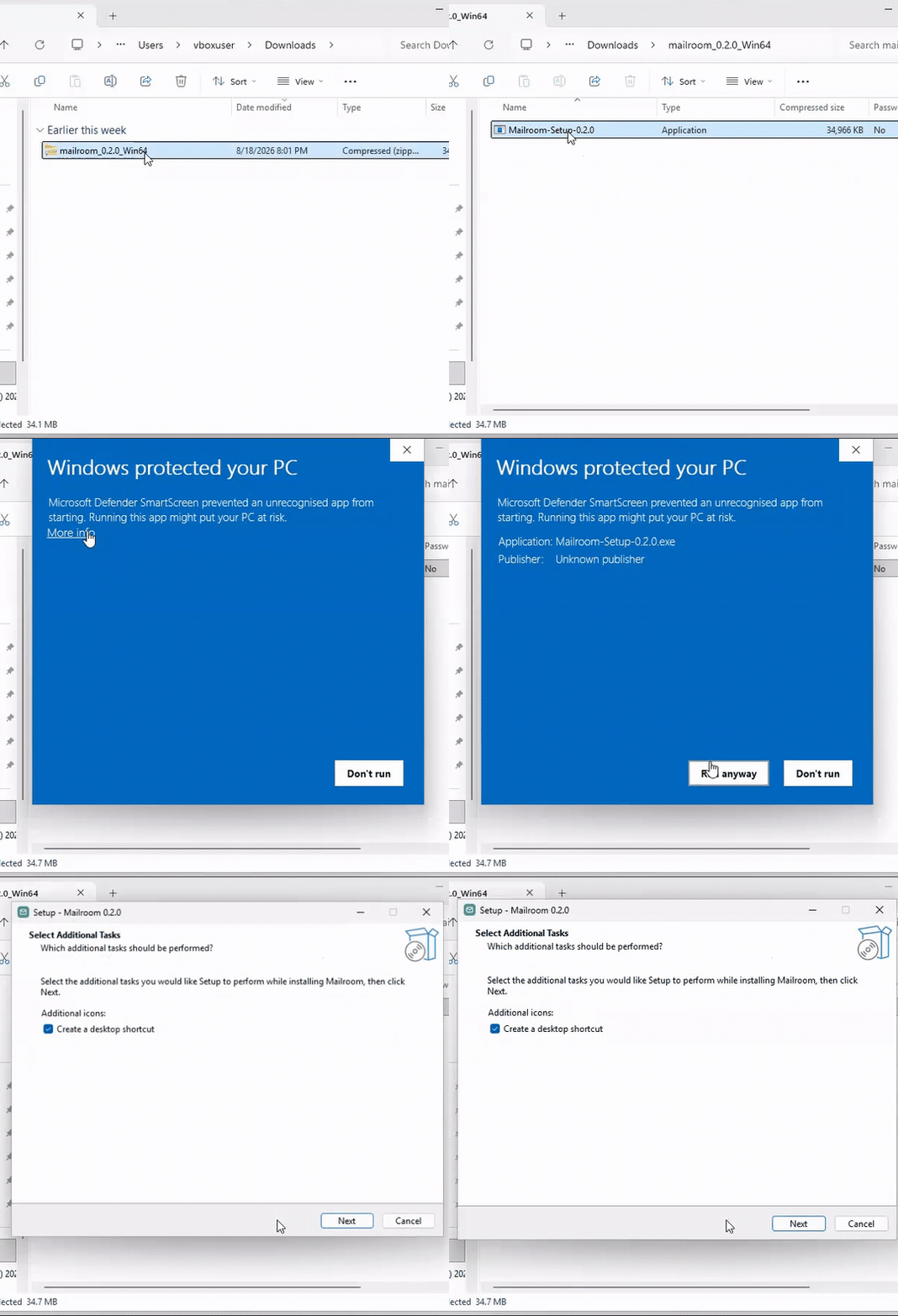
The warning fades as more people install Mailroom. We are not going to pretend it does not happen in the meantime.
Talk to a real person.
A human reads every message, and we answer as quickly as we can.
Your mail stays on your device — we only ever see what you choose to send us.
Reclaim the room in your inbox.
Start with a free trial: 14 days or 500 MB of cleanup, whichever comes first. No card. No subscription. Your mail is processed on your device.